Sample SEO Report
The VisRank detailed report covers all 49 core checks with severity levels, Trust & Entity evidence, AI Citation evidence, plain-language explanations, Fix My Issues, 3saved AI fixes for eligible issues, and specific fix guidance. Here's what's inside.
What's in the report
1. Executive summary
- Overall score (0-100) with grade
- Category scores: SEO, AEO, Security, Local
- Trust & Entity and AI Citation scores on new scans
- Total issues found by severity
- Top 3 quick wins ranked by impact
- Scan date and URL audited
2. SEO checks (13 checks)
- Title tag - value, length, and pass/fail
- Meta description - value, length, and pass/fail
- H1 analysis - count and content
- Canonical tag - present and self-referencing
- robots.txt - present, accessible
- sitemap.xml - present, accessible
- Image alt text - percentage with alts
- Viewport meta tag - mobile optimised
- HTTPS enforced
- OpenGraph tags - title, description, image
- HTML lang attribute
- Twitter Card meta tags
- noindex detection
3. AEO checks (18 checks)
- JSON-LD structured data - presence and types
- Visible Q&A content and optional FAQPage schema
- Organization schema - present and fields
- LocalBusiness schema - present and fields
- Step-by-step content and optional HowTo schema
- BreadcrumbList schema
- Semantic headings (H2 count)
- Contact details in content
- Entity clarity (business name in copy)
- Q&A content patterns
- llms.txt discovery file
- AI crawler access from robots.txt
- Content depth
- Author schema
- AI citability patterns
- Content freshness
- Concise answer blocks
- Structured answer patterns
4. Security checks (10 checks)
- HTTPS - active and redirecting
- HSTS header - present and max-age value
- CSP header - present
- X-Frame-Options - DENY or SAMEORIGIN
- Referrer-Policy header
- Permissions-Policy header
- X-Content-Type-Options - nosniff
- Mixed content detection
- Server header leak (Server / X-Powered-By)
- DNS-Prefetch-Control
5. Local checks (8 checks)
- Location mentions (city / suburb in copy)
- Phone number in content
- Street address present
- LocalBusiness schema
- Contact page linked from nav
- Google Maps embed
- Opening hours signals
- Review / testimonial signals
6. Trust & Entity evidence
- Business identity and public proof signals
- About, Contact, Privacy and Terms evidence
- sameAs and Organization schema evidence
- Author, founder or team information
- Google Business Profile consistency when relevant
- Reviews, testimonials or proof signals
7. AI Citation evidence
- Answer-first blocks and prompt coverage
- Buyer-intent prompt coverage
- Entity answer context
- Source and proof signals
- llms.txt, AI crawler access, freshness and citation-readiness checks
8. Issue list with fix guidance
- Every failing check listed with severity (high / medium / low)
- Plain-language explanation of why it matters
- Specific fix instructions or code examples
- Time estimate to fix (if applicable)
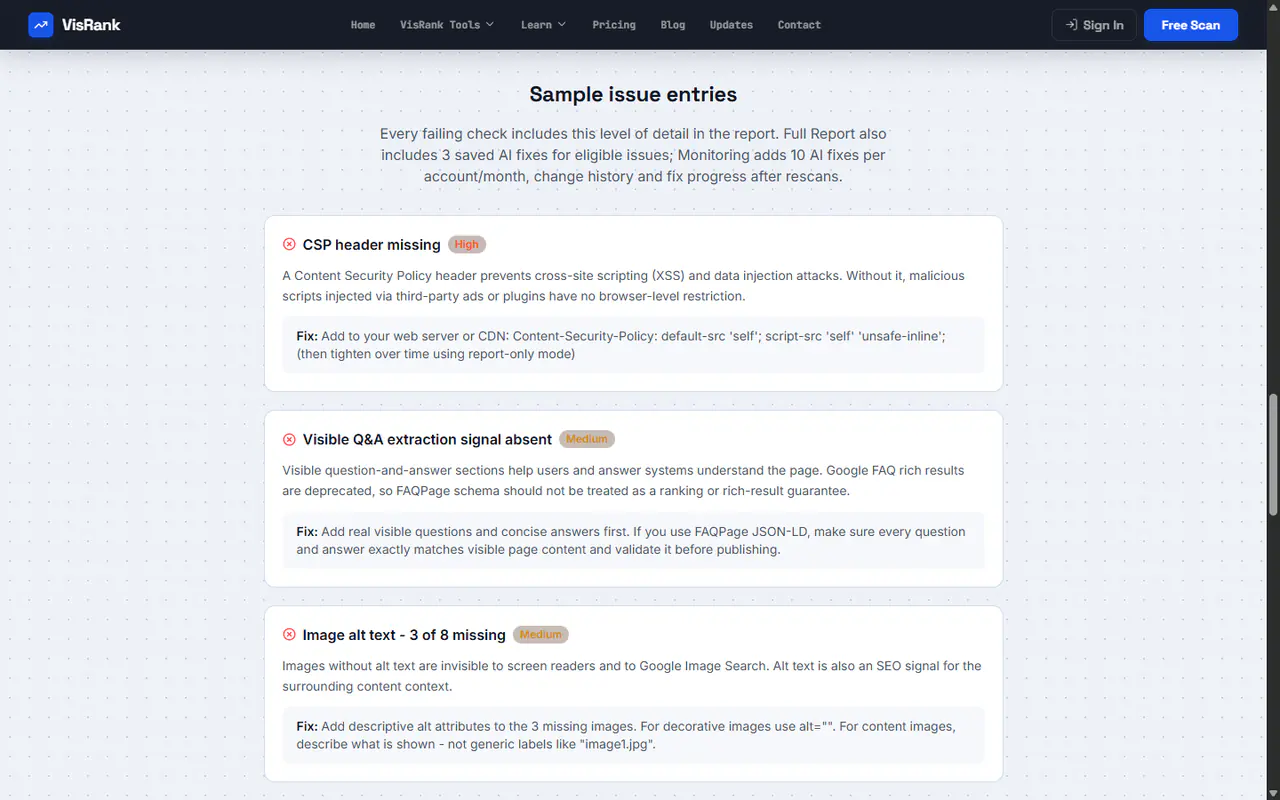
Sample issue entries
Every failing check includes this level of detail in the report. Full Report also includes 3 saved AI fixes for eligible issues; Monitoring adds 10 AI fixes per account/month, change history and fix progress after rescans.
A Content Security Policy header prevents cross-site scripting (XSS) and data injection attacks. Without it, malicious scripts injected via third-party ads or plugins have no browser-level restriction.
Fix: Add to your web server or CDN: Content-Security-Policy: default-src 'self'; script-src 'self' 'unsafe-inline'; (then tighten over time using report-only mode)
Visible question-and-answer sections help users and answer systems understand the page. Google FAQ rich results are deprecated, so FAQPage schema should not be treated as a ranking or rich-result guarantee.
Fix: Add real visible questions and concise answers first. If you use FAQPage JSON-LD, make sure every question and answer exactly matches visible page content and validate it before publishing.
Images without alt text are invisible to screen readers and to Google Image Search. Alt text is also an SEO signal for the surrounding content context.
Fix: Add descriptive alt attributes to the 3 missing images. For decorative images use alt="". For content images, describe what is shown - not generic labels like "image1.jpg".
Get your detailed report
Run a free scan first. If you want the full report with all issue explanations, Fix My Issues, 3 saved AI fixes and PDF export, unlock it for $10. One-time reports stay as stable snapshots; Monitoring is for ongoing rescans, 10 AI fixes/month and change tracking.
Common Questions
What is in the $10 detailed report
All 49 core check results with pass/fail status, severity, plain-language explanation of each finding, Trust & Entity evidence, AI Citation evidence on new scans, Fix My Issues, 3 saved AI fixes for eligible issues, and specific fix guidance including code examples where applicable. Includes score breakdown and top quick-win recommendations.
Can I share the PDF report with clients
Yes. The PDF is formatted for professional client delivery - it includes the site domain, full audit results, and actionable fix recommendations. Suitable for client handover or team workflow.
How is the paid report different from the free scan
The free scan shows your overall score, category breakdowns, AI Citation score, and top issues. The $10 report is a complete PDF with all 49 core checks, Trust & Entity evidence, AI Citation evidence, full explanations, severity levels, Fix My Issues, and 3 saved AI fixes for eligible issues. It is a stable one-time snapshot.
Related pages